Cloudflare Error 521 is a common issue that can make your website unavailable to visitors. When this error occurs, your server may be offline, or Cloudflare’s connection to your server may be blocked. This can hurt your SEO rankings and reduce your site’s credibility.
Understanding the causes and solutions for Error 521 is crucial to resolving this issue. This guide explains why it happens and provides simple, step-by-step methods to fix it.
What is Cloudflare Error 521?
Cloudflare Error 521 appears when the origin web server refuses connections from Cloudflare. In other words, Cloudflare can’t reach your server.
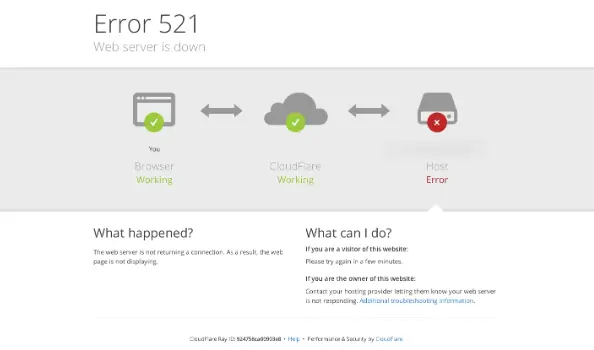
This error can happen due to several reasons:
- Your web server is down.
- Firewalls or security software are blocking Cloudflare.
- SSL/TLS settings are misconfigured.
- Other security modules or server settings prevent Cloudflare from connecting.
The result is a website downtime that can lead to lost visitors and revenue. Quick action is necessary to restore your site and protect your SEO performance.
Find out: Top Mistakes in WordPress Speed Optimization
Other Common Cloudflare Errors
While Cloudflare Error 521 is common, several other errors can disrupt your website. Understanding these issues helps you respond quickly and maintain uptime. Each error has its own cause and solution, so it’s useful to know the differences.
Cloudflare Error 502: Bad Gateway
Error 502 occurs when Cloudflare cannot receive a valid response from your server. This usually happens due to server overload, network issues, or misconfigured proxy settings. Checking server health and reviewing server logs often resolves this error.
Cloudflare Error 503: Service Unavailable
Error 503 indicates that your server is temporarily unavailable. High traffic, server maintenance, or resource limitations are common causes. Monitoring server load and scheduling maintenance during off-peak hours can prevent this issue.
Cloudflare Error 504: Gateway Timeout
Error 504 happens when Cloudflare times out waiting for a response from your server. Slow server processing or network latency is often responsible. Optimizing server performance and reviewing firewall or proxy configurations can reduce the likelihood of this error.
Cloudflare Error 520: Web Server Returned an Unknown Error
Error 520 is triggered when the origin server returns an unexpected response. Misconfigured software, faulty plugins, or server crashes are common causes. Identifying and fixing server-side problems usually resolves it quickly.
By understanding these common Cloudflare errors, you can act faster, maintain website availability, and ensure a smoother experience for your visitors.
Check out: Best Tools for Monitoring WordPress Site Performance
Understanding Cloudflare Configuration
Cloudflare acts as a middleman between your website and visitors. It improves page load speed, protects against attacks like DDoS, and manages SSL certificates.
To prevent Error 521, it’s important to configure Cloudflare correctly:
- Allow Cloudflare IPs: Your server firewall must whitelist Cloudflare’s IP addresses.
- Check SSL/TLS settings: Cloudflare offers multiple SSL modes, such as Flexible, Full, and Full (Strict). Misconfigured SSL can cause connection errors.
- Use the Cloudflare dashboard: Here you can manage firewall rules, SSL settings, and security features.
- Consult your hosting provider: Hosting teams can help verify server settings and Cloudflare configuration.
Proper configuration ensures smooth communication between Cloudflare and your server.
Common Causes of Cloudflare Error 521
Error 521 usually happens when your server refuses connections. Here are the most frequent causes:
- Web Server is Down: If your server is offline or unresponsive, Cloudflare cannot reach it. This is the most common cause of Error 521.
- Firewalls or Security Software Block: Some firewalls or security plugins may block Cloudflare’s IP addresses. This prevents Cloudflare from connecting to your server.
- SSL/TLS Misconfiguration: Expired or misconfigured SSL certificates can trigger Error 521. Using the wrong SSL mode in Cloudflare can also cause connection failures.
- Security Modules or Software: Modules like
mod_securityormod_antilorismay block Cloudflare’s requests. Server-side security tools need proper configuration to allow Cloudflare traffic.
- Blocked IPs in Firewall or .htaccess: Sometimes, your firewall or .htaccess file may inadvertently block Cloudflare IP addresses. This can prevent the server from responding correctly.
Need Help Fixing Cloudflare Errors?
Our experts can quickly identify and resolve Cloudflare issues. Contact us today!
Troubleshooting Cloudflare Error 521
Follow this step-by-step approach to troubleshoot the problem effectively.
Step 1: Check Server Status
The first step is to ensure your web server is online and responsive. If your server is down, Cloudflare cannot establish a connection, leading to Error 521.
You can check your server status using online tools like Pingdom, DownDetector, or even a simple ping test from your computer. If your server is offline, contact your web hosting provider to restore it.
Sometimes, server downtime happens due to maintenance, unexpected crashes, or resource overload. Ensuring your server is active is the foundation for resolving this error.
Step 2: Review Cloudflare Dashboard
Cloudflare acts as a middleman, so correct settings are essential. Log in to your Cloudflare dashboard and check the following:
- SSL/TLS mode: Cloudflare offers Flexible, Full, and Full (Strict) SSL modes. Choosing the wrong mode can cause connection issues.
- Firewall rules: Make sure no rules are unintentionally blocking traffic from Cloudflare.
- IP whitelisting: Ensure all Cloudflare IP addresses are allowed through your server firewall. This prevents your server from rejecting Cloudflare’s requests.
Adjusting these settings can solve most connection problems quickly.
Step 3: Check Server Firewall and .htaccess
Your server’s firewall or the .htaccess file may block Cloudflare traffic.
- Check your firewall settings and remove any rules that could prevent Cloudflare IPs from connecting.
- Similarly, review your .htaccess file for any deny rules that target Cloudflare IP ranges.
This step is crucial because even minor misconfigurations can stop Cloudflare from reaching your server.
Read: Ultimate Guide to WordPress Management
Step 4: Disable Conflicting Security Modules
Sometimes, security modules like mod_antiloris, mod_security, or certain WordPress security plugins can block legitimate Cloudflare requests.
Temporarily disabling these modules allows you to determine if they are causing the problem. If disabling them fixes the issue, you can adjust their settings to allow Cloudflare traffic while keeping your site secure.
Step 5: Verify SSL Certificates
SSL certificates are critical for establishing a secure connection. Check that your certificate is valid, active, and not expired. Also, ensure that your server’s SSL settings match the SSL mode in Cloudflare. Misaligned SSL settings can prevent Cloudflare from connecting, triggering Error 521.
Step 6: Check Server Error Logs
Your server’s error logs provide valuable insights. Look for entries indicating connection refusals, blocked IP addresses, or other issues that might prevent Cloudflare from reaching your server. Reviewing these logs often highlights the exact cause of the problem, making it easier to fix.
Step 7: Contact Your Web Hosting Provider
If you’ve completed all the above steps and the error persists, contact your hosting provider. Their team can check server configurations, firewall rules, and SSL setups in detail. They may also identify resource or network issues that are not visible from your end.
Preventing Future Cloudflare 521 Errors
Preventing Cloudflare Error 521 is easier than fixing it after it occurs. By taking a few proactive steps, you can ensure your website remains online, secure, and accessible to visitors. Regular maintenance and careful monitoring are key to avoiding connection issues with Cloudflare.
Regularly Update Cloudflare Settings and SSL Certificates
First, keep your Cloudflare settings and SSL certificates up-to-date. Expired SSL certificates or outdated configurations can cause connection failures. Regular updates ensure smooth communication between Cloudflare and your server.
Ensure Firewall Rules and .htaccess Files Allow Cloudflare Traffic
Next, review your server’s firewall rules and .htaccess files. Make sure Cloudflare IP addresses are whitelisted. Even small blocks or misconfigurations can lead to Error 521, so it’s important to allow all legitimate Cloudflare traffic.
Monitor Server Status and Resource Usage
It’s also essential to monitor your server’s uptime and resource usage. Overloaded servers or downtime can trigger errors. Tools like uptime monitors and resource trackers can alert you to potential problems before they affect visitors.
Read: Why Hiring a WordPress Security Consultant is Essential
Keep Server and Cloudflare Software Up-to-Date
Always maintain the latest versions of your server software and Cloudflare tools. Updates often include security patches and performance improvements that prevent connectivity issues.
Work With Your Hosting Provider
Finally, collaborate with your hosting provider. They can offer guidance, optimize server settings, and ensure that your website is configured to avoid future errors.
By following these steps, you reduce the risk of Error 521 and maintain a reliable, accessible website.
Role of WordPress Maintenance in Preventing WordPress Errors
Regular WordPress maintenance plays a vital role in keeping your website secure, fast, and error-free. Many WordPress errors, including plugin conflicts, theme issues, and server problems, can be prevented with consistent maintenance.

By performing routine checks and updates, you ensure that your site runs smoothly and avoids unexpected downtime.
Keep WordPress Core, Themes, and Plugins Updated
First, always update your WordPress core, themes, and plugins. Updates often include security patches, bug fixes, and performance improvements.
Outdated software can create vulnerabilities and cause errors such as broken pages, plugin conflicts, or even Cloudflare connection issues. Regular updates minimize these risks and ensure your site remains compatible with server and security settings.
Perform Regular Backups
Next, create regular backups of your website. Backups act as a safety net in case errors or crashes occur. If an update fails or a plugin causes a problem, restoring from a backup can prevent prolonged downtime. Using automated backup tools helps maintain consistency and reduces the risk of losing critical data.
Monitor Website Performance
Monitoring your site’s performance is also essential. Slow-loading pages, high server load, or resource limitations can lead to errors like 502, 503, or 521 when using services like Cloudflare. Regular performance checks allow you to optimize images, plugins, and server settings, preventing issues before they affect visitors.
Review Security Settings
Security maintenance is equally important. WordPress websites are frequent targets for hackers, and misconfigured security settings can block legitimate traffic or create errors. Regularly reviewing firewall rules, SSL certificates, and security plugins helps maintain smooth connectivity and reduces the risk of errors.
Clean Up Unused Plugins and Themes
Finally, remove unused or outdated plugins and themes. Unnecessary software increases the risk of conflicts, slows down your site, and can trigger errors. Keeping your WordPress environment clean ensures better performance and reduces troubleshooting efforts.
Collaborating with your hosting provider or maintenance experts ensures that server settings, backups, and security measures are properly configured. They can help prevent errors related to server downtime, firewall blocks, or Cloudflare connections.
Simple Steps: How to Update WordPress Safely
Conclusion
Cloudflare Error 521 is caused when the origin server refuses connections from Cloudflare. Common reasons include server downtime, firewall blocks, SSL issues, and security modules.
By following this guide, you can troubleshoot and resolve Error 521 effectively. Regular monitoring and maintenance can also prevent future occurrences. If problems continue, reach out to your hosting provider or consult the Cloudflare community for additional help.
With proper configuration and preventive measures, you can minimize website downtime and maintain SEO rankings, ensuring visitors always have access to your site.
FAQs About Error 521
Why am I seeing Error 521 web server?
Error 521 occurs when your origin server is down or refuses connections from Cloudflare, preventing visitors from accessing your website.
What does “verification successful waiting” mean?
It means the system has completed the verification process, but your action is on hold until the server confirms your request.
Can other security software cause issues with my website?
Yes, other security software installed on your server can block Cloudflare requests or certain scripts, leading to connection failures.
How do I verify you are human on a website?
You can verify you are human by completing the CAPTCHA or challenge provided, ensuring the system recognizes legitimate users.
What is flexible SSL in Cloudflare?
Flexible SSL allows your website to serve HTTPS traffic even if the origin server does not have an SSL certificate installed, providing basic security for your connection.
How can I check files on my server?
You can use a file manager or command-line tools to review the security, installed modules, or any scripts that may block Cloudflare requests.
Why do I get a “complete human by completing the action” message?
This message appears when the system requires human verification before proceeding, such as completing a CAPTCHA, to confirm you are human and prevent automated access.